
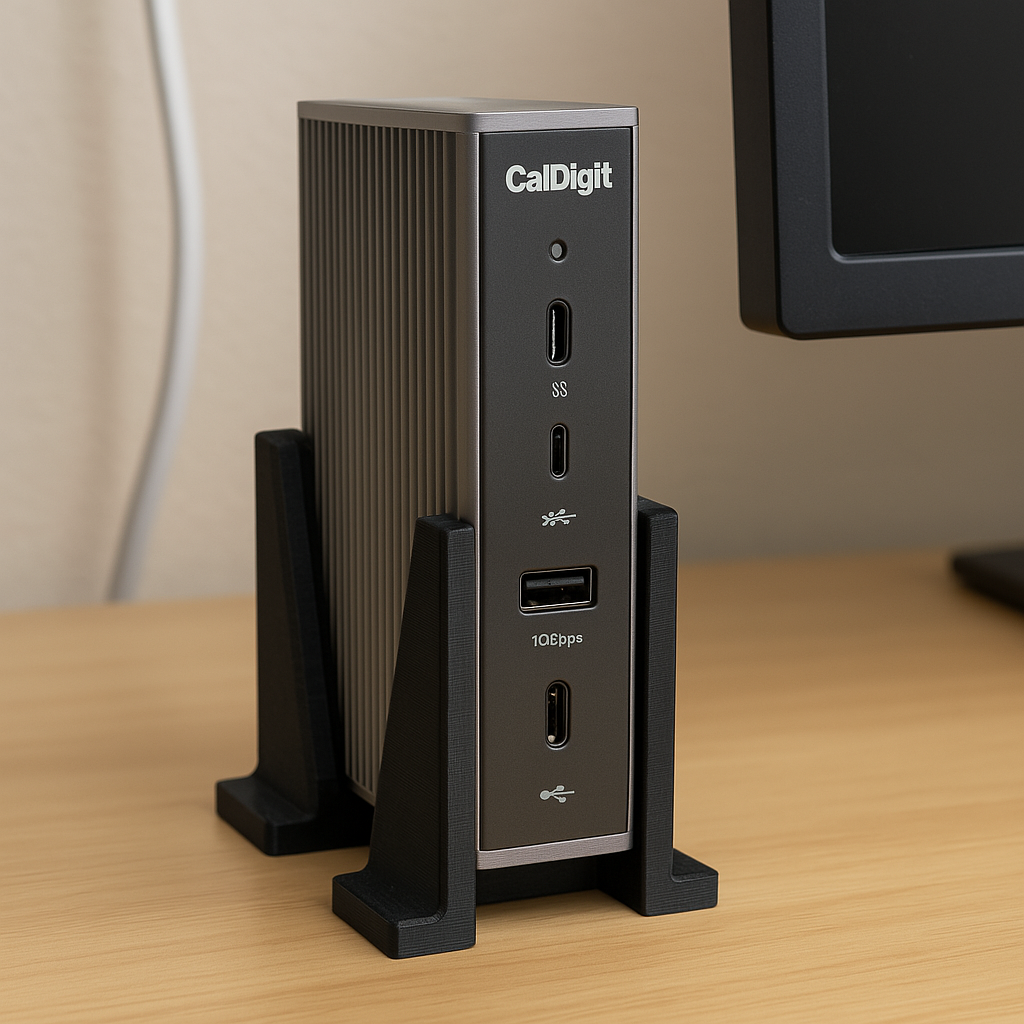
Caldigit is well known for its high-performance docking stations, USB-C hubs, and storage solutions—trusted by creative professionals, power users, and remote workers alike. Increasing interest in 3D printing to modify and enhance CalDigit products is being driven by more customers trying to maximise their workstations. This article looks at how people are using Caldigit 3D print accessories to customize their tech environment, strengthen their organization, and improve ergonomic design. 3D printing provides reasonable, low-cost solutions that transform your setup from cluttered to clean, whether you’re utilizing a Caldigit TS4, Element Hub, or Thunderbolt 4 dock.
Reasons to 3D Print CalDigit Accessories
CalDigit creates its goods with performance and beauty in mind. Official attachments are sparse, though, for workplace organizing and mounting flexibility, so 3D printing may really shine.
Advantages of 3D-Printed CalDigit Accessories:
- Designed especially for the CalDigit size, custom fit
- Simple to Change: Change sizes, include mounting holes, or join components
- Affordable: Steer clear of pricey third-party mounts.
Most Common CalDigit 3D-Printed Products
These are the 3D printed accessories for CalDigit gear, most searched and downloaded:
- Caldigit TS4 Under-Desk or Wall Mount
Custom brackets let you fasten the TS4 dock to a shelf, desk underneath, or wall. Ideal for enhancing wire routing and lowering desktop clutter. - Vertical Stand for CalDigit TS3 Plus
Maintains the dock vertically to conserve horizontal desk space. Exposing a greater surface area helps to improve heat dissipation. - Cable Organizers for Thunderbolt & USB-C
Made to go with CalDigit’s thin wires. Keeps them in position when not in use. - Monitor Arm Dock Holder
A 3D-printed cradle allowing you to put your CalDigit hub on the rear of a monitor arm. Perfect for MacBook or dual-monitor configurations. - Slide-in mounts allow you to dock your portable SSD straight on your desk or monitor.
Where to Look for CalDigit 3D Print Files (STL)
You don’t have to start from nothing; numerous CalDigit-compatible files are already online:
Top STL File Repositories
- Printables.com: Look for “dock holder” or “CalDigit TS4 mount”
- Thingiverse: Wide range of practical trays and mounts
- Cults3D: User reviews on paid and free choices
- Etsy: Certain artists provide pieces printed to order.
- MyMiniFactory: Premium designs from confirmed creators
Professional Tip: To prevent fitting problems, search for files tagged as tested with CalDigit TS3/TS4.
CalDigit Accessory Printing Best Practices
Follow this professional advice to make sure your 3D printing is effective and robust.
Suggested Print Settings:
- Material: ABS or PETG (stronger than PLA, more suitable for structural usage)
- Infill: 15–25% for cable holders, 30–50% for mounts
- Layer Height: For speed and quality balancing, 0.2mm
- Supports: Just for complicated brackets or overhangs
- Wall Thickness: Minimum 2–3 perimeters for additional strength
Mounting Advice:
- For under-desk use, apply 3M VHB tape (no drilling required).
- If using screws, include countersunk holes.
- For vertical holders, ensure the dock’s weight is uniformly distributed.
Real-Life Applications: How People Are Customizing Using 3D Prints
- MacBook Workstation in Minimalist Style
To cut down on clutter, a user built a vertical TS4 stand and included a bespoke MacBook stand with cable pass-through. - Desk Arrangement with Two Monitors
Using a 3D-printed bracket, a CalDigit Element Hub was fastened to the rear of a display. Printed cable clips neatly route USB-C cables under the desk. - Gaming and Streaming Station
3D printed holders for Tuff Nano SSDs let hot-swappable external drives be readily available during live streaming. - Dock Stand Travel-Friendly
Keeping the dock upright in co-working environments, a small, folding stand was printed for on-the-go use.
Links Boosting Internal & External SEO
Internal Links:
- Top Practical 3D Prints for Tech Enthusiasts
- Top Filaments for Functional 3D Prints
- 3D Printing Desk Cable Management Guide
External Links:
- Official CalDigit Website
- Printables – CalDigit TS4 Mount Files
- CalDigit Dock Accessories on Thingiverse
- Reddit’s r/3Dprinting – Request comments or post your creations
READ MORE – Best BJD 3D Print Files for Male Dolls: Where to Find Them & How to Get Started
FAQs:
- Could I 3D print a mount for my CalDigit TS4 dock?
Many tried designs for vertical, wall, and under-desk mounting are indeed accessible online. Simply make sure it suits your particular configuration and printer requirements.
- What material is best for 3D printing CalDigit accessories?
Its strength and adaptability make PETG perfect. Though it needs a closed printer, ABS is excellent for heat resistance. Though it might distort under pressure, PLA can function.
- Do older items like the TS3 Plus have CalDigit 3D print files?
Absolutely! Many designers provide files for legacy models such as TS3, TS3 Plus, and Element hubs. Always verify the product name in the STL file description.
- Without drilling holes in my desk, how can I fasten my printed mount?
For non-invasive attachment, use robust adhesive strips such as 3M VHB or Command Strips. Seek prints with flat surfaces made for adhesive application.
- May I modify the CalDigit 3D models to suit my office?
Of course! Scale or change models before printing using free software such as Tinkercad, Fusion 360, or PrusaSlicer.
Conclusion:
Combining CalDigit docks and hubs with bespoke 3D-printed accessories is a game-changer for designing a high-performance, clutter-free, and individualized workstation. 3D printing offers you the freedom to do it your way, whether you want to conserve space, effectively route cables, or just display your technology with pride.
Every aspect may be fine-tuned to fit your configuration and your taste, from under-desk mounts to vertical stands.